← 수업 제작 도구
홈 › Components › Graph and Graphing Calc › 화면 5

화면 5. Graph.bounds [source]

원본: Computation Layer 문서(Graph) · Try It (원본 화면)

화면 번호5 / 29
문서 항목 설명 (원문)Gets the bounds of a graph component.

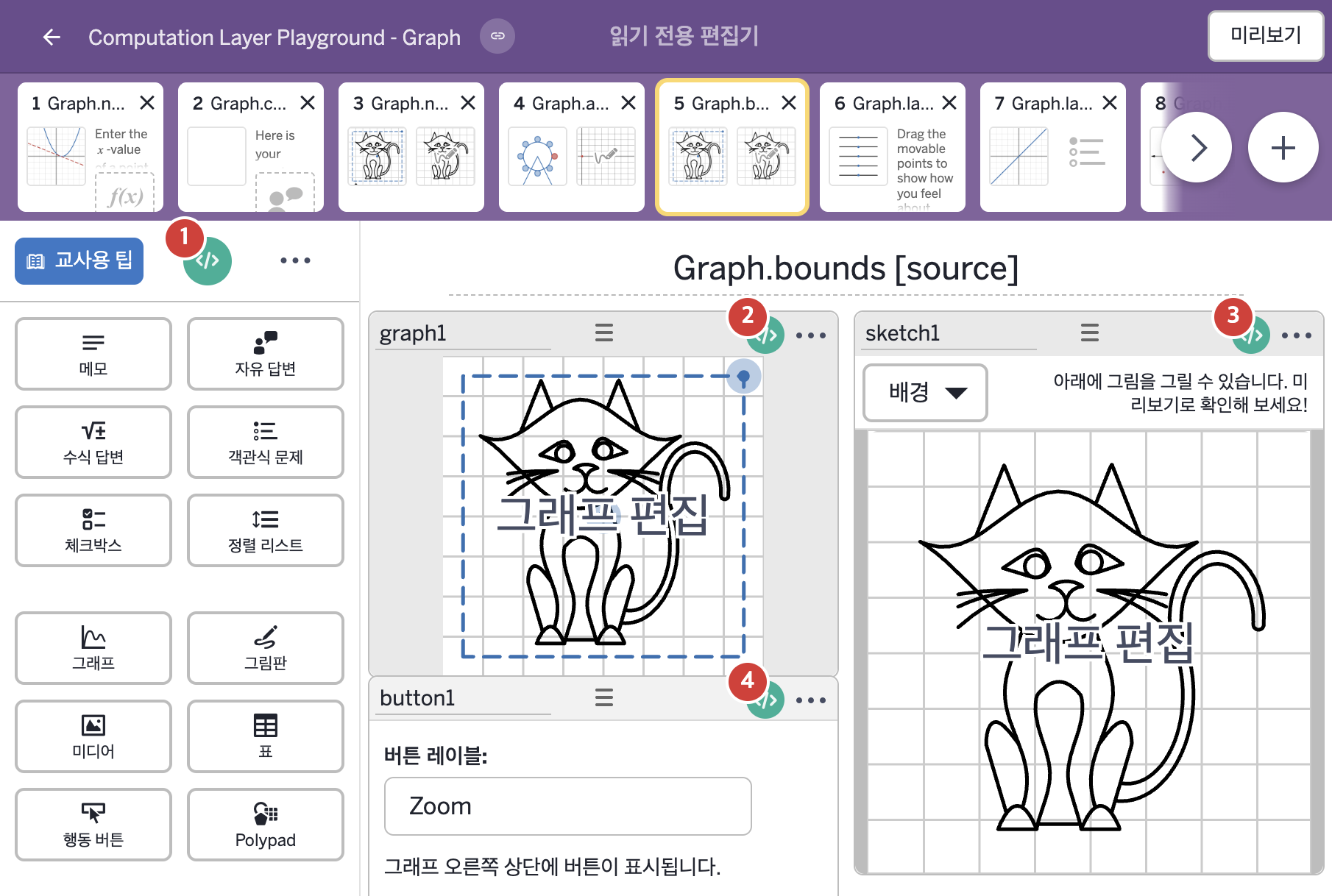
1. 화면 캡처 (빨간 번호 = 아래 표의 번호)

화면 5 캡처

2. CL이 입력된 곳

코드 안의 회색 줄은 원문 영어 주석이고, 파란 줄은 그 영어 주석의 번역이며, 연분홍 줄은 코드가 하는 일의 설명이다.

번호이름종류CL 코드 원문, 번역, 설명
1master CL
(화면 전체)
SCREEN
# Uses a subtitle sink to add some instruction for students below the title.
▷ subtitle sink로 제목 아래에 학생을 위한 안내를 추가한다.
subtitle: "Use the sketch tool to complete the drawing of this cat.\nThe grid and window adjustment are there to help you add detail."
▶ 화면 제목 아래에 표시할 부제목(subtitle)은 "Use the sketch tool to complete the drawing of this cat.\nThe grid and window adjustment are there to help you add detail."(스케치 도구를 사용해 이 고양이 그림을 완성하시오. 격자와 창 조절은 세부를 더 그려 넣도록 돕기 위해 있다.)로 한다.
글자 안의 \n은 줄바꿈이라서 두 줄로 표시된다.
2graph1그래프
# This uses a background sink to bring the sketch into the graph.
▷ background sink로 그림판의 그림을 그래프 안으로 가져온다.

background: layerStack(sketchLayer(sketch1.sketch),sketchLayer(sketch1.currentStroke))
▶ 그래프의 배경(background)은 그림판 sketch1에 그린 스케치(sketch1.sketch)와 지금 긋고 있는 선(sketch1.currentStroke)을 각각 레이어로 만들어 쌓은 것(layerStack(sketchLayer(sketch1.sketch),sketchLayer(sketch1.currentStroke)))으로 한다.
sketch1.sketch는 그림판 sketch1에 그린 스케치 전체, sketch1.currentStroke는 지금 긋고 있는 선을 가져온다. sketchLayer(…)는 스케치로 레이어를 만들고, layerStack(…)은 레이어 여러 개를 쌓아 하나의 레이어로 만든다. 그림판에 그린 그림과 긋는 중인 선이 이 그래프의 배경에 그대로 나타난다.
# This indicates whether the zoom button has been pressed or # not. We will hide the movable points if it has been pressed. ▷ 줌 버튼이 눌렸는지를 나타낸다. 눌렸다면 움직이는 점들을 숨긴다. number("z_{oom}"): when button1.timeSincePress() = 0 0 otherwise 1 ▶ 그래프의 변수 "z_{oom}"은 button1.timeSincePress()가 0이면 0, 아니면 1로 한다.
button1.timeSincePress()는 행동 버튼 button1을 누른 뒤 지난 시간(초)을 알려 준다. 재설정 링크를 누르거나 같은 화면의 구성요소를 선택하거나 편집하면 0으로 돌아가고, 기본으로 10초까지 센다.
# Set the bounds of this sketch component using the variables # x_m, x_M, y_m, y_M in the graph when the button has been pressed. ▷ 버튼이 눌렸을 때 그래프의 변수 x_m, x_M, y_m, y_M으로 이 그림판의 경계를 정한다. bounds: when button1.timeSincePress() = 0 makeBounds(-4,4,-4,4) otherwise makeBounds(graph1.number("x_m"), graph1.number("x_M"), graph1.number("y_m"), graph1.number("y_M")) ▶ 그래프의 경계(bounds)는 button1.timeSincePress() = 0이면 x와 y 모두 -4부터 4까지(makeBounds(-4,4,-4,4)), 그 밖에는 graph1의 변수 x_m, x_M, y_m, y_M의 값으로 만든 범위(makeBounds(graph1.number("x_m"), graph1.number("x_M"), graph1.number("y_m"), graph1.number("y_M")))로 한다.
makeBounds(왼쪽, 오른쪽, 아래, 위)는 경계를 만들고, when은 조건을 차례로 확인해 처음 맞는 값을 쓴다.
3sketch1그림판
# This will set the bounds of the sketch to match the bounds
# of the graph component.
▷ 그림판의 경계를 그래프 구성요소의 경계와 같게 정한다.

bounds: graph1.bounds
▶ 그림판의 경계(bounds)는 그래프 graph1의 경계(graph1.bounds)로 한다.
graph1.bounds는 그래프 graph1의 경계를 가져온다. graph1의 경계가 바뀌면 그림판의 영역도 똑같이 바뀐다.
4button1행동 버튼
# Set the text of the reset label.
▷ 재설정(reset) 라벨의 글자를 정한다.

resetLabel: "Reset"
▶ 행동 버튼의 재설정 라벨(resetLabel)은 "Reset"(재설정)으로 한다.
학생이 버튼을 누른 뒤 다시 시작할 때 누르는 재설정 링크에 이 글자가 표시된다.