← 수업 제작 도구
홈 › Components › Graph and Graphing Calc › 화면 4

화면 4. Graph.animationTime [source]

원본: Computation Layer 문서(Graph) · Try It (원본 화면)

화면 번호4 / 29
문서 항목 설명 (원문)Gets the position of the animation playhead. Use in conjunction with animationDuration.

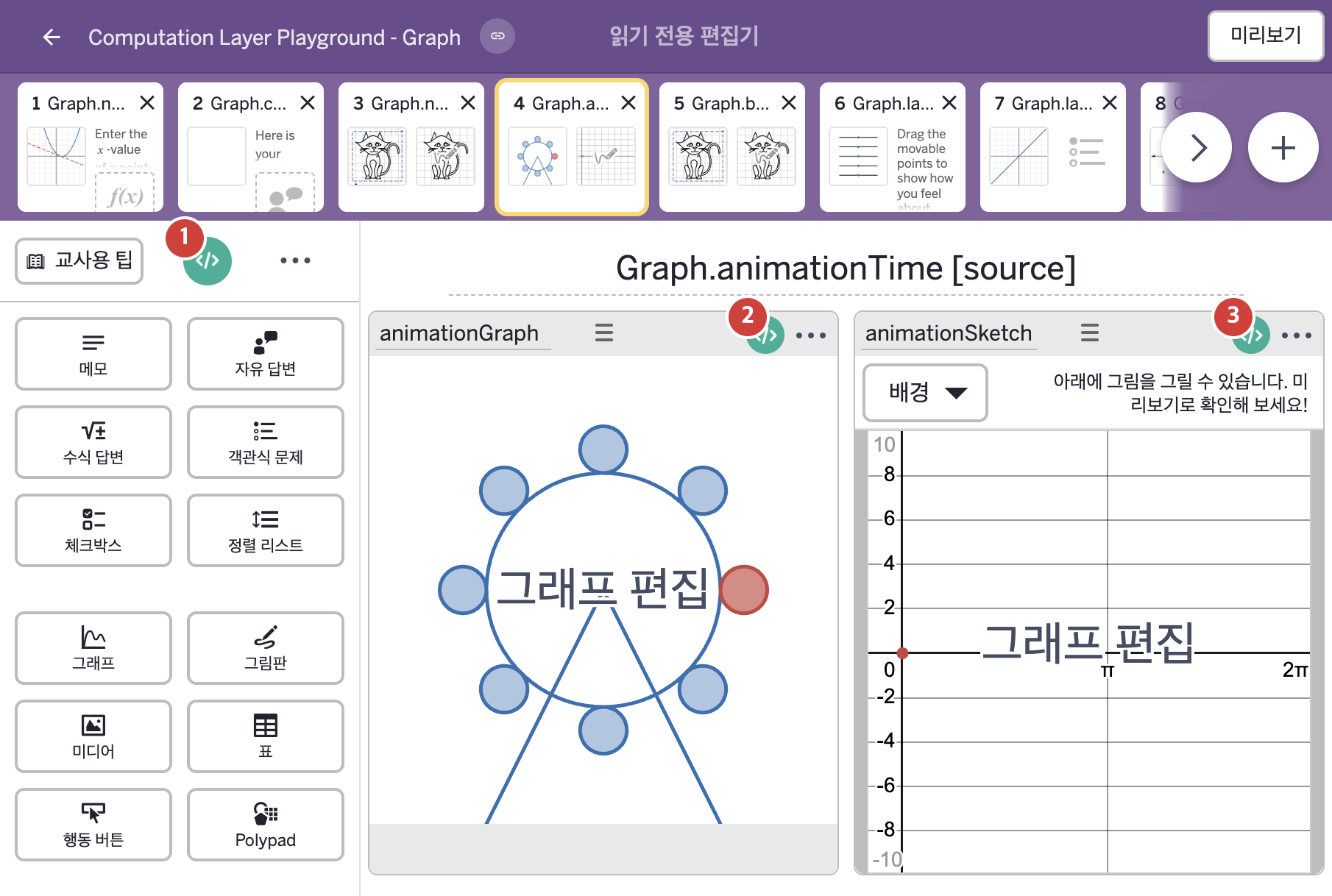
1. 화면 캡처 (빨간 번호 = 아래 표의 번호)

화면 4 캡처

2. CL이 입력된 곳

코드 안의 회색 줄은 원문 영어 주석이고, 파란 줄은 그 영어 주석의 번역이며, 연분홍 줄은 코드가 하는 일의 설명이다.

번호이름종류CL 코드 원문, 번역, 설명
1master CL
(화면 전체)
SCREEN
subtitle: "Use the sketch tool to trace the path of the red circle."
▶ 화면 제목 아래에 표시할 부제목(subtitle)은 "Use the sketch tool to trace the path of the red circle."(스케치 도구를 사용해 빨간 원의 경로를 따라 그리시오.)로 한다.
2animationGraph그래프
# Sets the length of time the animation playhead runs for.
▷ 애니메이션 재생바가 재생되는 시간의 길이를 정한다.

animationDuration: 6.28
▶ 애니메이션 재생 시간(animationDuration)은 6.28초로 한다.
이 값을 정하면 그래프 위에 재생바(playhead)가 생긴다. 6.28은 약 2π이다.
# Sets a value in the graph to be defined by the time of the # animation playhead. ▷ 그래프의 값을 애니메이션 재생바의 시간으로 정한다. number("t_0"): this.animationTime ▶ 그래프의 변수 "t_0"는 this.animationTime으로 한다.
this.animationTime은 이 그래프의 재생 위치를 알려 준다. 재생바가 움직이면 "t_0"의 값도 같이 바뀐다.
# Uses the animation time to set the numberList to be defined # by the y-values of the sketch at x-values defined by the # animation time. ▷ 애니메이션 시간을 이용해 numberList를 그림판의 y값들로 정한다. 이때 y값을 읽는 x값은 애니메이션 시간이 정한다. numberList("y_1"): animationSketch.sketch.yValuesAt(this.animationTime) ▶ 그래프의 숫자배열(numberList) "y_1"은 그림판 animationSketch의 스케치가 재생 위치에서 지나가는 y값들(animationSketch.sketch.yValuesAt(this.animationTime))로 한다.
animationSketch.sketch는 그림판에 그린 스케치이고, yValuesAt(x)는 그 스케치가 주어진 x값에서 지나가는 모든 y값을 숫자배열로 돌려준다. 여기서는 x 자리에 this.animationTime(재생 위치)을 넣었다. 재생바가 움직이는 동안 그림판에 그린 스케치의 y값이 숫자배열 "y_1"에 계속 들어온다.
3animationSketch그림판
# Sets a value in this sketch to be defined by the time of the 
# graph's animation playhead.
▷ 이 그림판의 값을 그래프 애니메이션 재생바의 시간으로 정한다.

number("t_0"): animationGraph.animationTime
▶ 그래프 배경의 변수 "t_0"는 그래프 animationGraph의 재생 위치(animationGraph.animationTime)로 한다.
animationGraph.animationTime은 그래프 animationGraph의 재생 위치를 알려 준다. 그림판에 그래프 배경이 있을 때 그림판의 number(…)는 그 배경 그래프 안의 변수 값을 정한다. 여기서는 number("t_0")이다. 그림판의 배경 그래프에서도 재생바와 같은 시간이 쓰인다.