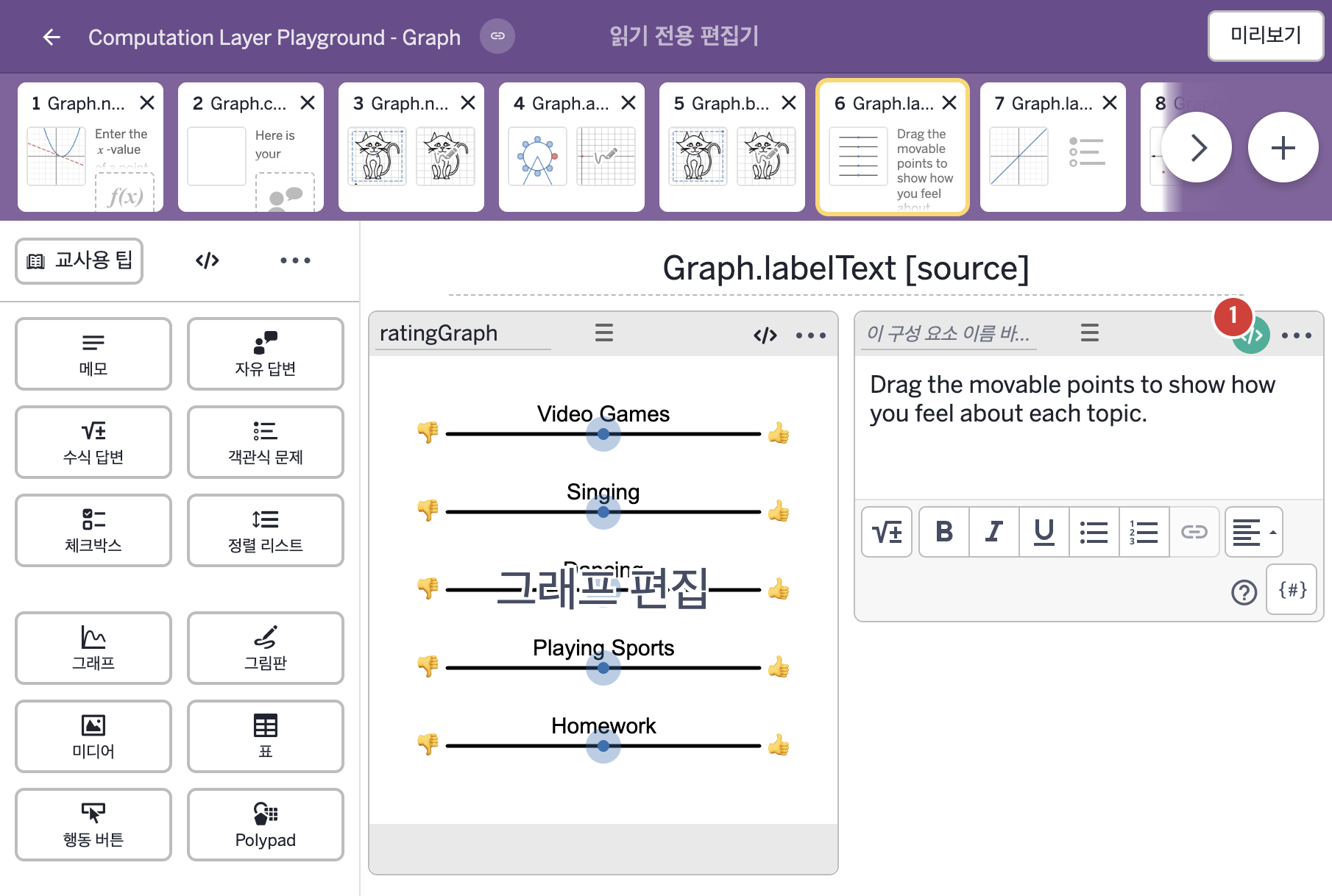
코드 안의 회색 줄은 원문 영어 주석이고, 파란 줄은 그 영어 주석의 번역이며, 연분홍 줄은 코드가 하는 일의 설명이다.
| 번호 | 이름 | 종류 | CL 코드 원문, 번역, 설명 |
|---|
| 1 | 레이블 없는 메모 | 메모 | # This sets the variable to be equal to the text of
# the label if the student drags the slider above zero.
# If students have it less than or equal to zero, it will
# be blank and not display any text.
▷ 학생이 슬라이더를 0보다 크게 올렸다면 변수를 그 라벨의 글자로 정한다. 0 이하라면 빈 글자가 되어 아무것도 표시되지 않는다.
topic1 = when ratingGraph.number("x_1") <= 0 "" otherwise "• ${ratingGraph.labelText("l_1")}\n"
▶ 변수 topic1은 ratingGraph의 x_1의 값(ratingGraph.number("x_1"))이 0 이하이면 빈 글자, 그렇지 않으면 "• " 뒤에 l_1의 라벨(ratingGraph.labelText("l_1"))과 줄바꿈을 붙인 글자로 한다.
labelText("l_1")은 ratingGraph 안의 l_1의 라벨 글자를 가져오고, ${ }는 글자 안에 값을 끼워 넣는 표기이다. 글자 끝의 \n은 줄바꿈이라서 라벨 뒤에서 줄이 바뀐다. topic1 = …은 이름: 값 형태가 아니라 변수를 정하는 줄이며, 이 변수는 content에서 ${topic1}로 가져다 쓴다.
topic2 = when ratingGraph.number("x_2") <= 0 "" otherwise "• ${ratingGraph.labelText("l_2")}\n"
topic3 = when ratingGraph.number("x_3") <= 0 "" otherwise "• ${ratingGraph.labelText("l_3")}\n"
topic4 = when ratingGraph.number("x_4") <= 0 "" otherwise "• ${ratingGraph.labelText("l_4")}\n"
▶ 변수 topic2, topic3, topic4는 topic1과 같은 방식으로, 각각 ratingGraph의 x_2~x_4의 값이 0 이하이면 빈 글자, 그렇지 않으면 l_2~l_4의 라벨을 쓴 글자로 한다.
주제마다 같은 규칙으로 한 줄씩 만든다.
topic5 = when ratingGraph.number("x_5") = 0 "" otherwise "• ${ratingGraph.labelText("l_5")}!"
▶ 변수 topic5는 ratingGraph의 x_5의 값(ratingGraph.number("x_5"))이 0과 같으면 빈 글자, 그렇지 않으면 "• " 뒤에 l_5의 라벨과 느낌표를 붙인 글자("• ${ratingGraph.labelText("l_5")}!")로 한다.
topic1~topic4와 다른 점은 두 가지이다. 조건이 <= 0이 아니라 = 0이고, 줄 끝이 줄바꿈 \n이 아니라 느낌표 !이다.
content:
"Drag the movable points to show how you feel about each topic.\n\nThe things you like are:\n${topic1}${topic2}${topic3}${topic4}${topic5}"
▶ 메모의 내용(content)은 "Drag the movable points to show how you feel about each topic.\n\nThe things you like are:\n"(각 주제에 대해 어떻게 느끼는지 보여 주도록 움직이는 점을 끌어 옮기시오. 좋아하는 것은 다음과 같다:) 뒤에 ${topic1}~${topic5}를 차례로 이어 붙인 글자로 한다.
글자 안의 \n은 줄바꿈이고, ${ }는 글자 안에 변수의 값을 끼워 넣는 표기이다. topic1~topic4는 값이 0보다 클 때만, topic5는 값이 0이 아닐 때만 라벨이 나타나고, 그렇지 않으면 빈 글자라서 나타나지 않는다. 학생이 값을 바꾸면 메모의 내용도 바로 바뀐다. content는 메모에 직접 적은 글을 덮어쓴다.
|