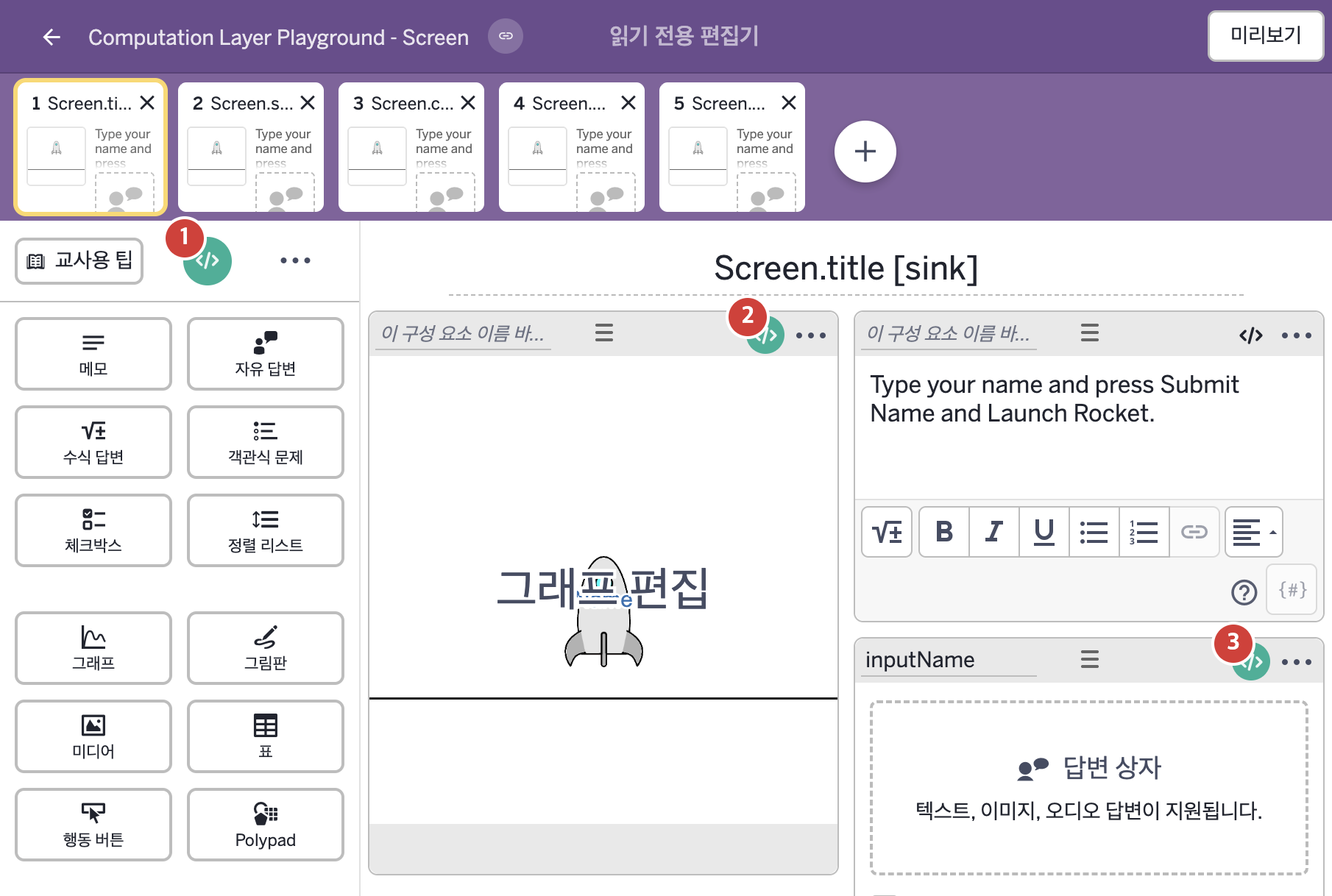
코드 안의 회색 줄은 원문 영어 주석이고, 파란 줄은 그 영어 주석의 번역이며, 연분홍 줄은 코드가 하는 일의 설명이다.
| 번호 | 이름 | 종류 | CL 코드 원문, 번역, 설명 |
|---|
| 1 | master CL
(화면 전체) | SCREEN | # This sets the title of the screen to say "Hi"
# followed by whatever is typed into the input
# field and an exclamation point.
# Note: ${} is used here to bring the content from
# the input and place it inside of the string.
▷ 화면의 제목을 "Hi"로 시작하고, 이어서 입력칸에 입력된 글, 마지막에 느낌표가 오도록 정한다.
참고: ${}는 입력칸의 내용을 가져와 글자 안에 넣을 때 쓴다.
title: "Hi ${inputName.content} !"
▶ 화면의 제목(title)은 "Hi ${inputName.content} !"(Hi, inputName의 입력값, 공백과 느낌표)로 한다.
${ }는 글자 안에 변수의 값을 끼워 넣는 표기이다.
|
| 2 | 레이블 없는 그래프 | 그래프 | # Make your name appear on the rocket
▷ 이름이 로켓에 나타나게 한다.
pointLabel("A"): inputName.content
▶ 점 A의 라벨은 자유 답변 구성요소 inputName에 학생이 입력한 값(inputName.content)으로 한다.
pointLabel("A")는 A=(1,2)처럼 정의된 점의 라벨 글자를 정하며, 이름이 점의 이름과 같아야 하고 준 글자와 정확히 같게 표시된다.
# Make the rocket take off when the button is pressed
▷ 버튼을 누르면 로켓이 이륙하게 한다.
number("b"): inputName.timeSinceSubmit
▶ 그래프의 변수 b는 제출 버튼을 누른 뒤 지난 시간(초)(inputName.timeSinceSubmit)으로 한다.
number("b")는 그래핑 계산기 안의 변수 b의 값을 정하며 기존 정의가 있어도 덮어쓴다.
# Make the rocket go faster (You can set it here OR in the graph itself)
▷ 로켓이 더 빨리 가게 한다. (여기서 정해도 되고 그래프 안에서 직접 정해도 된다.)
number("s"): 8
▶ 그래프의 변수 s는 8로 한다.
|
| 3 | inputName | 자유 답변 | submitLabel: "Submit Name and Launch Rocket"
▶ 자유 답변의 제출 버튼 라벨(submitLabel)은 "Submit Name and Launch Rocket"(이름을 제출하고 로켓 발사)로 한다.
|