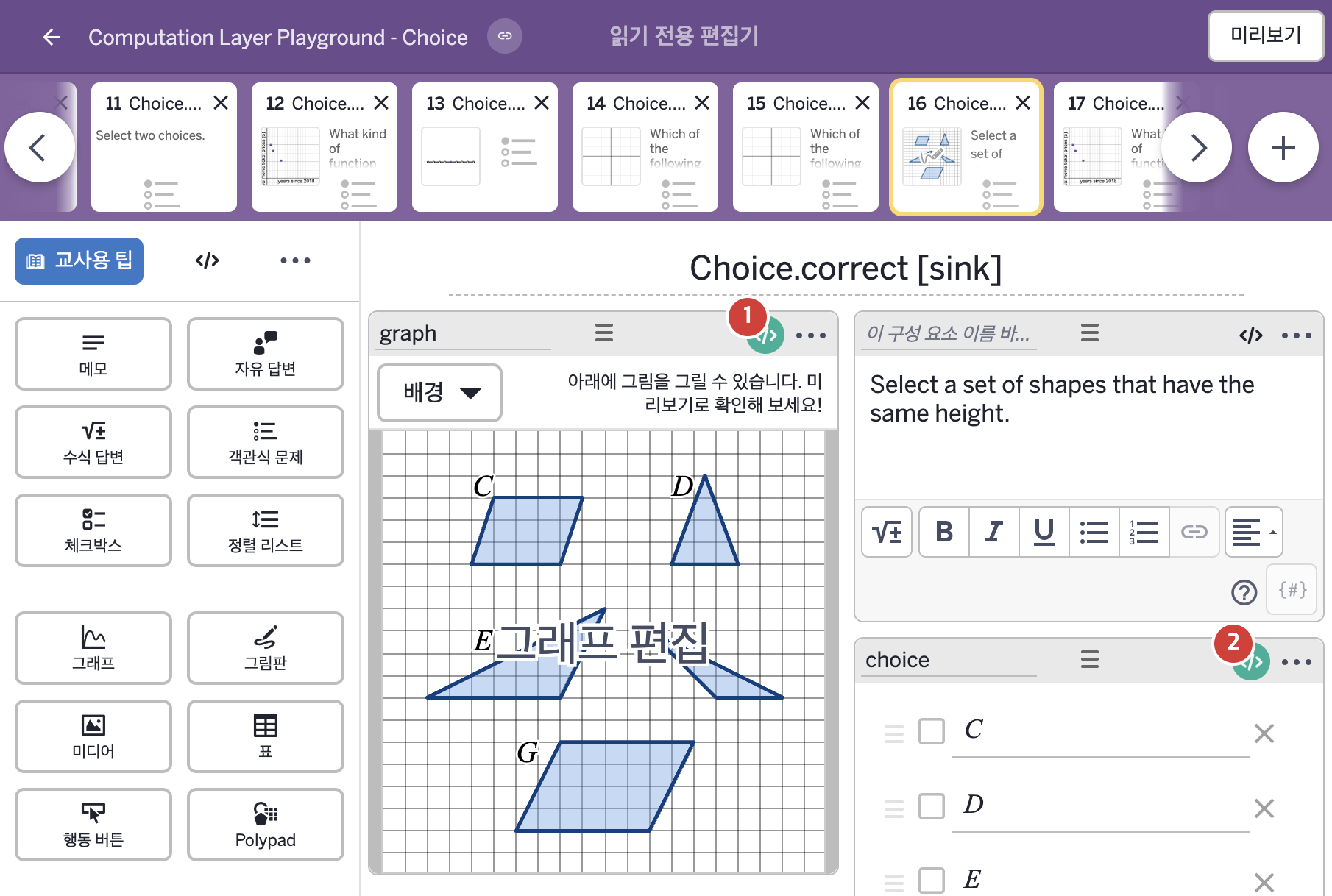
코드 안의 회색 줄은 원문 영어 주석이고, 파란 줄은 그 영어 주석의 번역이며, 연분홍 줄은 코드가 하는 일의 설명이다.
| 번호 | 이름 | 종류 | CL 코드 원문, 번역, 설명 |
|---|
| 1 | graph | 그림판 | c = choice
▶ 변수 c는 choice로 한다.
a = b는 a가 언제나 b의 값이라는 뜻이다. 아래의 c.isSelected(1)처럼 c로 choice에서 값을 가져온다.
# Mark this component as a view-only component
# so that we can display a check rather than a dot on the dashboard
▷ 이 구성요소를 보기 전용(view-only) 구성요소로 표시해, 대시보드에 점 대신 체크를 표시할 수 있게 한다.
readOnly: true
▶ 읽기 전용 여부(readOnly)는 true로 한다.
true이면 이 그림판은 화면의 정답 여부 계산에서 제외된다.
# Sets the window bounds of this graph using CL
▷ CL로 이 그래프의 창(window) 경계를 정한다.
bounds: makeBounds(this.number(`x_m`), this.number(`x_M`), this.number(`y_m`), this.number(`y_M`))
▶ 그림판의 경계(bounds)는 makeBounds(this.number(`x_m`), this.number(`x_M`), this.number(`y_m`), this.number(`y_M`))로 한다.
makeBounds(왼쪽, 오른쪽, 아래, 위)는 경계를 만드는 함수이다. 그림판에 그래프 배경이 있을 때 this.number(…)는 그 배경 그래프 안의 변수 값을 읽어 온다. bounds는 이 그림판의 경계를 정하며, 그림판에 그래프 배경이 있으면 그 배경도 이 영역에 맞춰 바뀐다. 변수 이름은 백틱으로 감싸 적었으며, 백틱으로 감싼 글자는 latex 값이다.
# Sets the default color to black
▷ 기본 색을 검은색으로 정한다.
initialColor: colors.black
▶ 처음 색(initialColor)은 colors.black으로 한다.
initialColor는 시작 색을 정하고, colors.black은 Desmos 계산기에서 쓰는 검은색이다.
# Sets the default sketch tool to the line tool
▷ 기본 그림판 도구를 선 도구로 정한다.
initialTool: sketchTools.line
▶ 처음 도구(initialTool)는 sketchTools.line으로 한다.
initialTool은 시작 도구를 정하고, sketchTools.line은 직선 도구이다.
# Set up indicators for each shape's selections. Used to toggle
# between the default and darkened fill in the display.
▷ 각 도형이 선택되었는지를 나타내는 표시 변수를 만든다. 화면에서 기본 채우기와 어둡게 칠한 채우기를 전환하는 데 쓴다.
number(`i_{sSelectedC}`): when c.isSelected(1) 1 otherwise 0
▶ 그림판 배경 그래프의 변수 `i_{sSelectedC}`는 c의 1번 보기가 선택되었다면(c.isSelected(1)) 1, 아니면 0으로 한다.
number(…)는 그림판에 그래프 배경이 있을 때 그 배경 그래프 안의 변수 값을 정한다. 변수 이름은 백틱으로 감싸 적었으며, 백틱으로 감싼 글자는 latex 값이다. isSelected(번호)는 객관식 구성요소에서 그 번호의 보기가 선택되었는지를 참 또는 거짓으로 알려 준다.
number(`i_{sSelectedD}`): when c.isSelected(2) 1 otherwise 0
number(`i_{sSelectedE}`): when c.isSelected(3) 1 otherwise 0
number(`i_{sSelectedF}`): when c.isSelected(4) 1 otherwise 0
number(`i_{sSelectedG}`): when c.isSelected(5) 1 otherwise 0
▶ 그림판 배경 그래프의 변수 `i_{sSelectedD}`~`i_{sSelectedG}`는 각각 c의 2번~5번 보기가 선택되었으면 1, 아니면 0으로 한다.
`i_{sSelectedC}`와 같은 작업을 반복한 것이다.
|
| 2 | choice | 체크박스 | # Marks the screen correct if the student chose either the first and
# fourth options or the second, third, and ffifth options
# in the checkbox component.
▷ 학생이 체크박스 구성요소에서 첫 번째와 네 번째 보기를 골랐거나, 두 번째, 세 번째, 다섯 번째 보기를 골랐다면 화면을 정답으로 표시한다.
correct:
(this.isSelected(1) and this.isSelected(4) and not(this.isSelected(2) or this.isSelected(3) or this.isSelected(5))) or
(this.isSelected(2) and this.isSelected(3) and this.isSelected(5) and not(this.isSelected(1) or this.isSelected(4)))
▶ 정답 조건(correct)은 1번과 4번 보기가 모두 선택되고 2번, 3번, 5번 보기는 하나도 선택되지 않았거나, 2번, 3번, 5번 보기가 모두 선택되고 1번과 4번 보기는 하나도 선택되지 않았으면 참, 아니면 거짓으로 한다.
and는 두 조건이 모두 참일 때 참이고, or는 둘 중 하나라도 참이면 참이며, not(…)은 참/거짓을 뒤집는다. correct는 참이면 교사 대시보드 요약에 회색 체크를 표시한다.
|