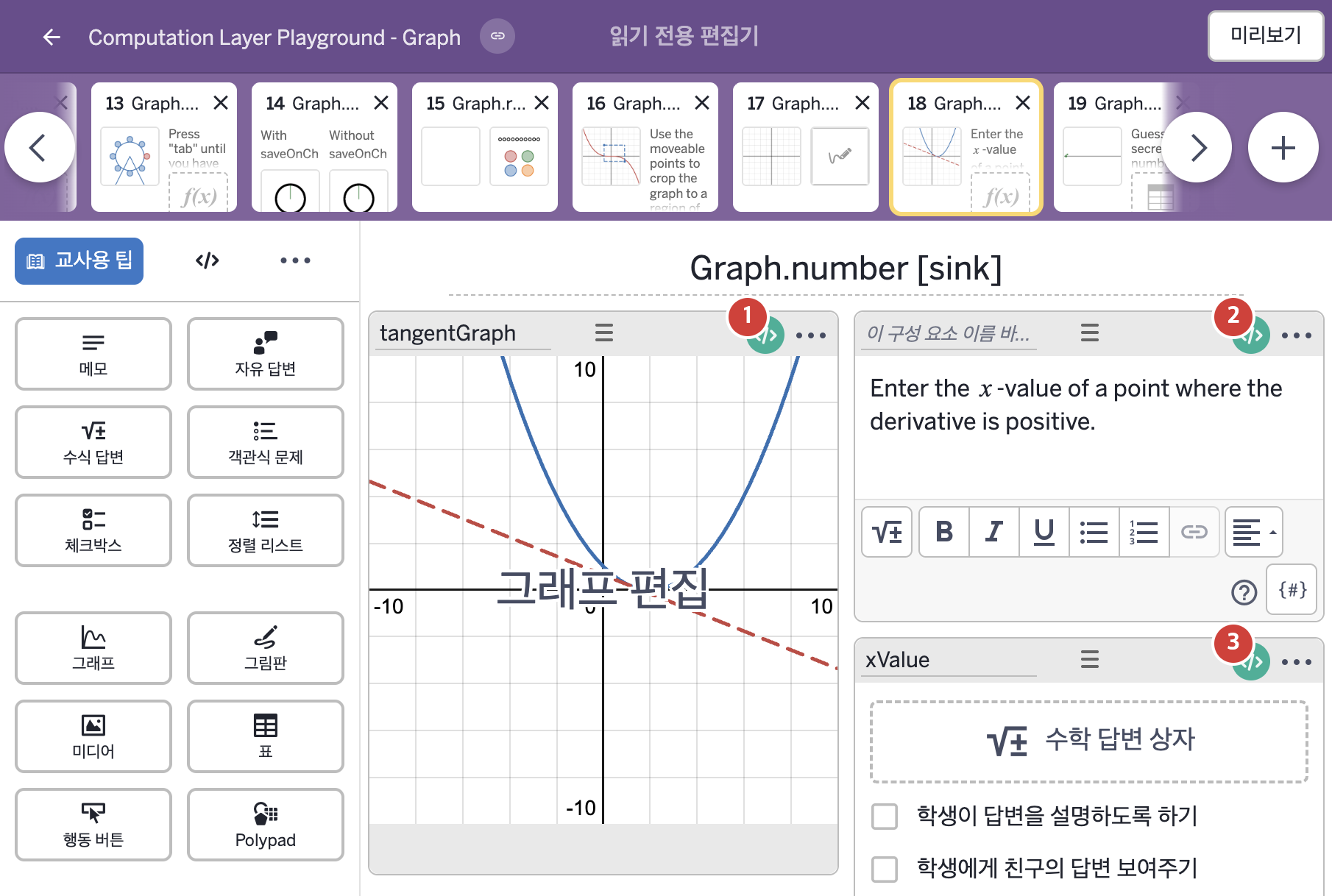
코드 안의 회색 줄은 원문 영어 주석이고, 파란 줄은 그 영어 주석의 번역이며, 연분홍 줄은 코드가 하는 일의 설명이다.
| 번호 | 이름 | 종류 | CL 코드 원문, 번역, 설명 |
|---|
| 1 | tangentGraph | 그래프 | # Sets the value of "a" in the graphing calculator to be
# the numeric value of "xValue" provided that it has been
# submitted. Otherwise we choose an x value that is far outside
# of the graph bounds.
▷ xValue의 값이 제출되었다면 그래핑 계산기의 변수 "a"의 값을 그 값으로 정한다. 제출되지 않았을 때는 경계를 한참 벗어난 값으로 정한다.
number("a"):
when xValue.submitted xValue.numericValue
otherwise 10000
▶ 그래프의 변수 "a"는 xValue(수식 답변)에 답이 제출되었다면(xValue.submitted) 그 값의 숫자값(xValue.numericValue)으로, 제출되지 않았다면 그래프 경계(bounds)를 한참 벗어난 10000으로 한다.
number("a")는 이 그래프 안의 변수 "a"의 값을 정하고, submitted는 답이 제출되었는지를 참 또는 거짓으로, numericValue는 입력한 식을 계산한 숫자값을 알려 준다. when은 조건을 차례로 확인해 처음 맞는 값을 쓴다.
|
| 2 | 레이블 없는 메모 | 메모 | # Sets a variable as true when the "c_orrect" variable
# in the tangentGraph calculator component is equal to 1.
▷ tangentGraph 그래핑 계산기 구성요소의 변수 "c_orrect"가 1과 같으면 변수를 true로 정한다.
correct = tangentGraph.number("c_{orrect}") = 1
▶ 변수 correct는 그래프 tangentGraph의 변수 "c_{orrect}"의 값이 1과 같으면 참, 아니면 거짓(tangentGraph.number("c_{orrect}") = 1)으로 한다.
tangentGraph.number("c_{orrect}")는 그래프의 변수 "c_{orrect}"의 값을 읽어 오고, =는 같은지를 비교한다.
# Sets a feedback variable conditionally on whether the math input "xValue"
# has been submitted and whether or not it's correct.
▷ 수식 답변 "xValue"가 제출되었는지, 그리고 정답인지에 따라 feedback 변수를 정한다.
feedback =
when xValue.submitted and correct "\n\nThat's correct.\n\nCan you find another value where the derivative is positive?"
when xValue.submitted and not(correct) "\n\nThat's incorrect.\n\nTry to find a `x`-value where the derivative is positive."
otherwise ""
▶ 변수 feedback은 제출했고 정답이면(xValue.submitted and correct) "\n\nThat's correct.\n\nCan you find another value where the derivative is positive?"(정답이다. 도함수가 양수인 다른 값도 찾을 수 있겠는가?), 제출했지만 오답이면(xValue.submitted and not(correct)) "\n\nThat's incorrect.\n\nTry to find a x-value where the derivative is positive."(오답이다. 도함수가 양수가 되는 x값을 찾아보시오.), 그 밖(제출 전)에는 빈 글자로 한다.
xValue.submitted는 수식 답변 xValue에 답이 제출되었는지를 참 또는 거짓으로 알려 주고, and는 두 조건이 모두 참일 때 참이며, not(correct)는 correct의 반대(오답)이다. 문장 앞의 \n\n은 줄바꿈 두 번(빈 줄)이고, 글자 안의 백틱(`)은 그 글자를 수식 모양으로 표시하게 한다. when은 조건을 차례로 확인해 처음 맞는 값을 쓴다.
content: "Enter the `x`-value of a point where the derivative is positive.${feedback}"
▶ 메모의 내용(content)은 "Enter the x-value of a point where the derivative is positive."(도함수가 양수인 점의 x값을 입력하시오.) 뒤에 feedback의 값을 붙인 글자("…${feedback}")로 한다.
${feedback}은 글자 안에 변수 feedback의 값을 끼워 넣는 표기이다. 제출하기 전에는 문제 문장만, 제출한 뒤에는 문제 문장 아래에 피드백이 이어서 나타난다.
|
| 3 | xValue | 수식 답변 | # Sets the correct sink as true when the "c_orrect" variable
# in the tangentGraph calculator component is equal to 1.
▷ tangentGraph 그래핑 계산기 구성요소의 변수 "c_orrect"가 1과 같으면 correct sink를 true로 정한다.
correct: tangentGraph.number("c_{orrect}") = 1
▶ 정답 조건(correct)은 그래프 tangentGraph의 변수 "c_{orrect}"의 값이 1이면 참(정답), 아니면 거짓으로 한다(tangentGraph.number("c_{orrect}") = 1).
tangentGraph.number("c_{orrect}")는 그래프 안의 변수 값을 읽어 오고, =는 같은지를 비교한다. correct는 참이면 교사 대시보드 요약에 회색 체크를 표시한다.
# Throws a warning and tooltip when the student hasn't
# entered an actual number in the math input.
▷ 학생이 수식 답변에 실제 숫자를 입력하지 않았을 때 경고와 툴팁을 띄운다.
warning:
when not(isDefined(xValue.numericValue)) "Student didn't enter a number."
otherwise ""
▶ 교사 대시보드의 경고(warning)는 not(isDefined(xValue.numericValue))가 참이면, 즉 xValue의 숫자값이 정의되지 않았다면 "Student didn't enter a number."(학생이 숫자를 입력하지 않았다.), 그렇지 않으면 빈 글자(경고 없음)로 한다.
isDefined(…)는 어떤 값이 정의되어 있는지를 참 또는 거짓으로 알려 주고, not(…)은 그 반대이다. warning은 교사 대시보드의 경고 아이콘에 말풍선으로 글자를 표시한다.
|