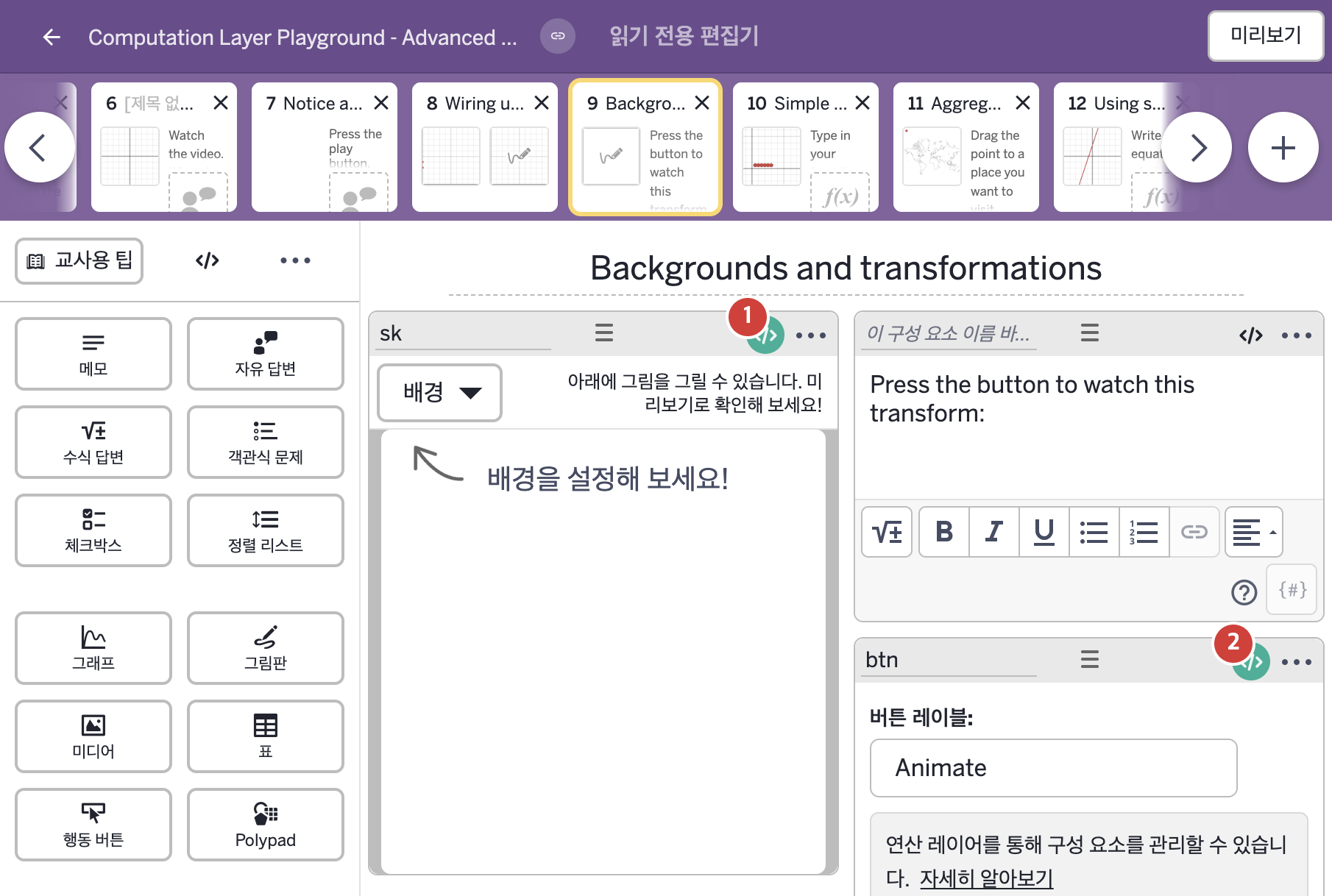
코드 안의 회색 줄은 원문 영어 주석이고, 파란 줄은 그 영어 주석의 번역이며, 연분홍 줄은 코드가 하는 일의 설명이다.
| 번호 | 이름 | 종류 | CL 코드 원문, 번역, 설명 |
|---|
| 1 | sk | 그림판 | isAnimating = btn.timeSincePress > 0
▶ 변수 isAnimating은 btn.timeSincePress가 0보다 큰지(참/거짓)로 한다.
timeSincePress는 버튼을 누른 뒤 지난 시간(초)을 알려 주고, 재설정 링크를 누르거나 같은 화면의 구성요소를 선택하거나 편집하면 0으로 돌아가며 기본으로 10초까지 센다.
#disallow sketching
▷ 스케치를 막는다.
disableSketch: isAnimating
▶ 그림 그리기 금지(disableSketch)는 변수 isAnimating으로 한다.
disableSketch가 참이면 그림판에 그리는 것이 허용되지 않는다.
#and hide the sketch (the background will show it instead)
▷ 그리고 스케치를 숨긴다(대신 배경이 그 스케치를 보여 준다).
hideSketch: isAnimating
▶ 스케치 숨기기(hideSketch)는 변수 isAnimating으로 한다.
hideSketch는 학생의 스케치를 숨기고, 그려도 숨겨지므로 스케치도 막는다.
#transform the sketch:
▷ 스케치를 변환한다:
xTransform = simpleFunction("x+${btn.timeSincePress}","x","y")
▶ 변수 xTransform은 "x+${btn.timeSincePress}"를 입력 변수 "x", "y"에 대한 함수로 만든 것, 즉 x값에 버튼을 누른 뒤 지난 시간을 더하는 함수로 한다.
simpleFunction(…)은 latex 글자를 받아 함수를 돌려주며, 첫 인자는 latex 글자, 나머지 인자는 입력 변수 이름이다. ${ }는 글자 안에 변수의 값을 끼워 넣는 표기이다.
yTransform = simpleFunction("y","x","y")
▶ 변수 yTransform은 "y"를 입력 변수 "x", "y"에 대한 함수로 만든 것, 즉 y값은 그대로 두는 함수로 한다.
background: sketchLayer(this.sketch.transform(xTransform,yTransform))
▶ 그림판의 배경(background)은 스케치를 xTransform, yTransform으로 변환한 것을 레이어로 만든 것(sketchLayer(this.sketch.transform(xTransform,yTransform)))으로 한다.
background는 그래프나 그림판의 배경 레이어를 정한다. sketchLayer는 스케치를 레이어로 바꾸는 함수이고, .transform은 함수들로 스케치를 변환한다.
|
| 2 | btn | 행동 버튼 | disabled: sk.sketch.strokeCount = 0 and sk.sketch.pointCount = 0
▶ 행동 버튼의 비활성화 조건(disabled)은 sk.sketch.strokeCount = 0 and sk.sketch.pointCount = 0, 즉 그림판 sk에 획과 점이 모두 없을 때 참으로 한다.
sketch는 그림판에 그려진 모든 것을 나타내는 스케치 객체를 가져오고, strokeCount는 스케치를 받아 획의 수를, pointCount는 점의 수를 숫자로 돌려준다. 두 =는 값이 같은지 비교하는 것이고, and는 둘 다 참이어야 참이다.
|