홈 › Components › Action Button (행동 버튼) › 화면 11
화면 11. Action Button.resetOnChange [sink]
원본: Computation Layer 문서(Action Button (행동 버튼)) · Try It (원본 화면)
| 화면 번호 | 11 / 12 |
|---|---|
| 문서 항목 설명 (원문) | resetOnChange Specify a string value. If that value changes, the component resets. |
1. 화면 캡처 (빨간 번호 = 아래 표의 번호)
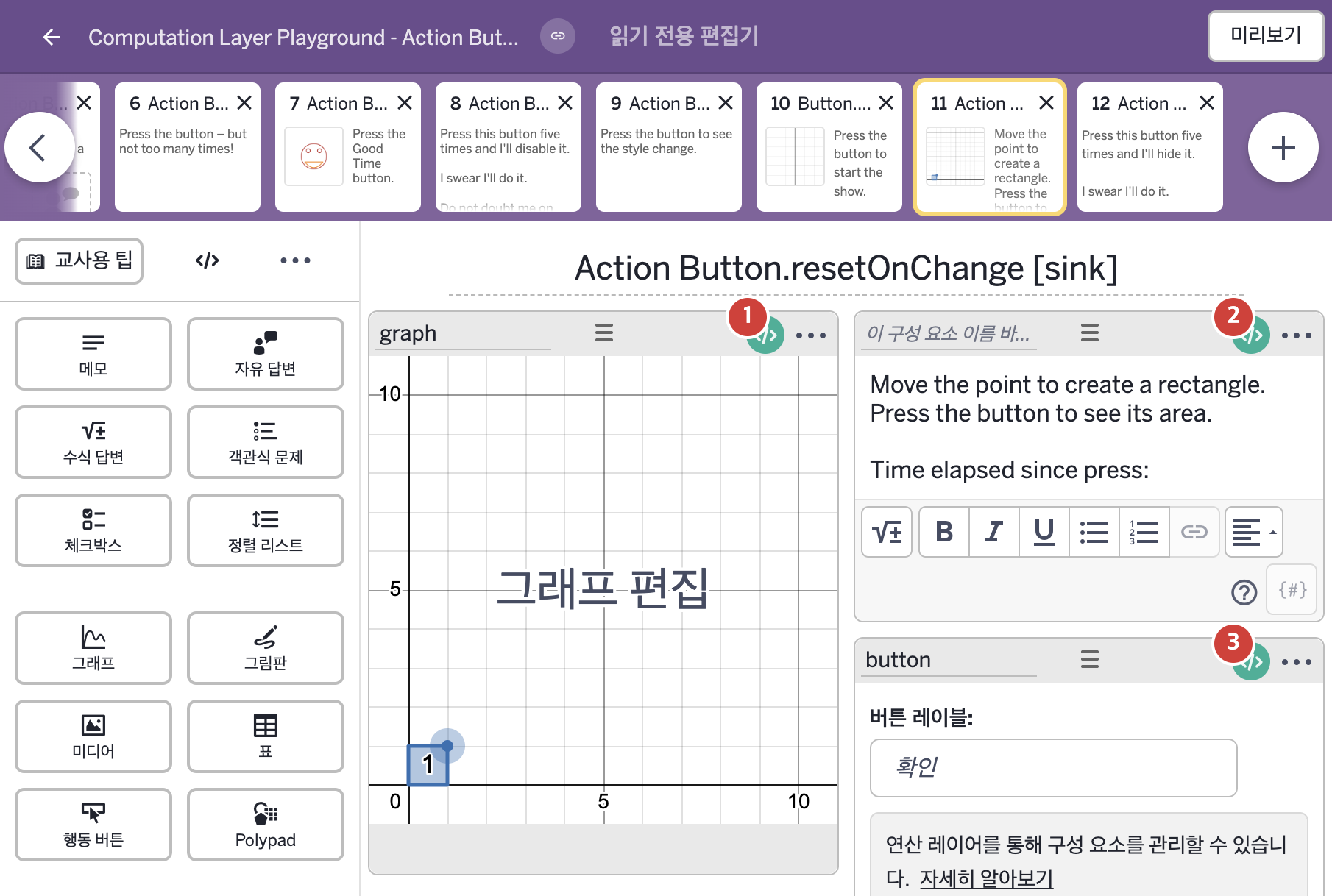
- Move the point to create a rectangle. Press the button to see its area. Time elapsed since press:
2. CL이 입력된 곳
| 번호 | 이름 | 종류 | CL 코드 원문, 번역, 설명 |
|---|---|---|---|
| 1 | graph | 그래프 | # Creates a slider for animation using the time since the button # has been pressed. ▷ 버튼을 누른 뒤 지난 시간으로 애니메이션용 슬라이더를 만든다. number("t_0"): button.timeSincePress(1) ▶ 그래프의 변수 t_0은 행동 버튼 button을 누른 뒤 지난 시간( |
| 2 | 레이블 없는 메모 | 메모 | # We added a visual of the button's time since press here to better # illustrate the resetting of the timer on change. ▷ 타이머가 값이 바뀔 때 재설정되는 모습을 더 잘 보여 주기 위해, 버튼을 누른 뒤 지난 시간을 보여 주는 표시를 여기에 추가했다. content: "Move the point to create a rectangle. Press the button to see its area. Time elapsed since press: ${button.timeSincePress(100)}" ▶ 메모의 내용(content)은 "Move the point to create a rectangle. Press the button to see its area."(점을 움직여 직사각형을 만드시오. 버튼을 눌러 넓이를 보시오.)로 시작해 마지막 줄 "Time elapsed since press: ${button.timeSincePress(100)}"(버튼을 누른 뒤 지난 시간: …)로 끝나는 글로 한다. |
| 3 | button | 행동 버튼 | # resetOnChange looks for any change in a string. # Here, it resets the button time to 0 when the point is moved. ▷ resetOnChange는 글자의 어떤 변화든 찾아낸다. 여기서는 점을 움직이면 버튼의 시간을 0으로 재설정한다. resetOnChange: "${graph.number("v")}${graph.number("h")}" ▶ 행동 버튼의 변경 시 자동 재설정(resetOnChange)은 "${graph.number("v")}${graph.number("h")}", 즉 그래프 graph의 변수 v의 값과 변수 h의 값을 이어 붙인 글자로 한다. |