화면 6. Table.disableRowChanges [sink]
원본: Computation Layer 문서(Table (표)) · Try It (원본 화면)
| 화면 번호 | 6 / 17 |
|---|
| 문서 항목 설명 (원문) | disableRowChanges Sets a Boolean value that indicates whether or not the student can add or remove rows. Similar to fill-in-the-blank mode, but allows for existing cells to be edited. Highly recommended for use with any cell specific sources. (e.g., cellContent or cellNumericValue.) |
|---|
1. 화면 캡처 (빨간 번호 = 아래 표의 번호)
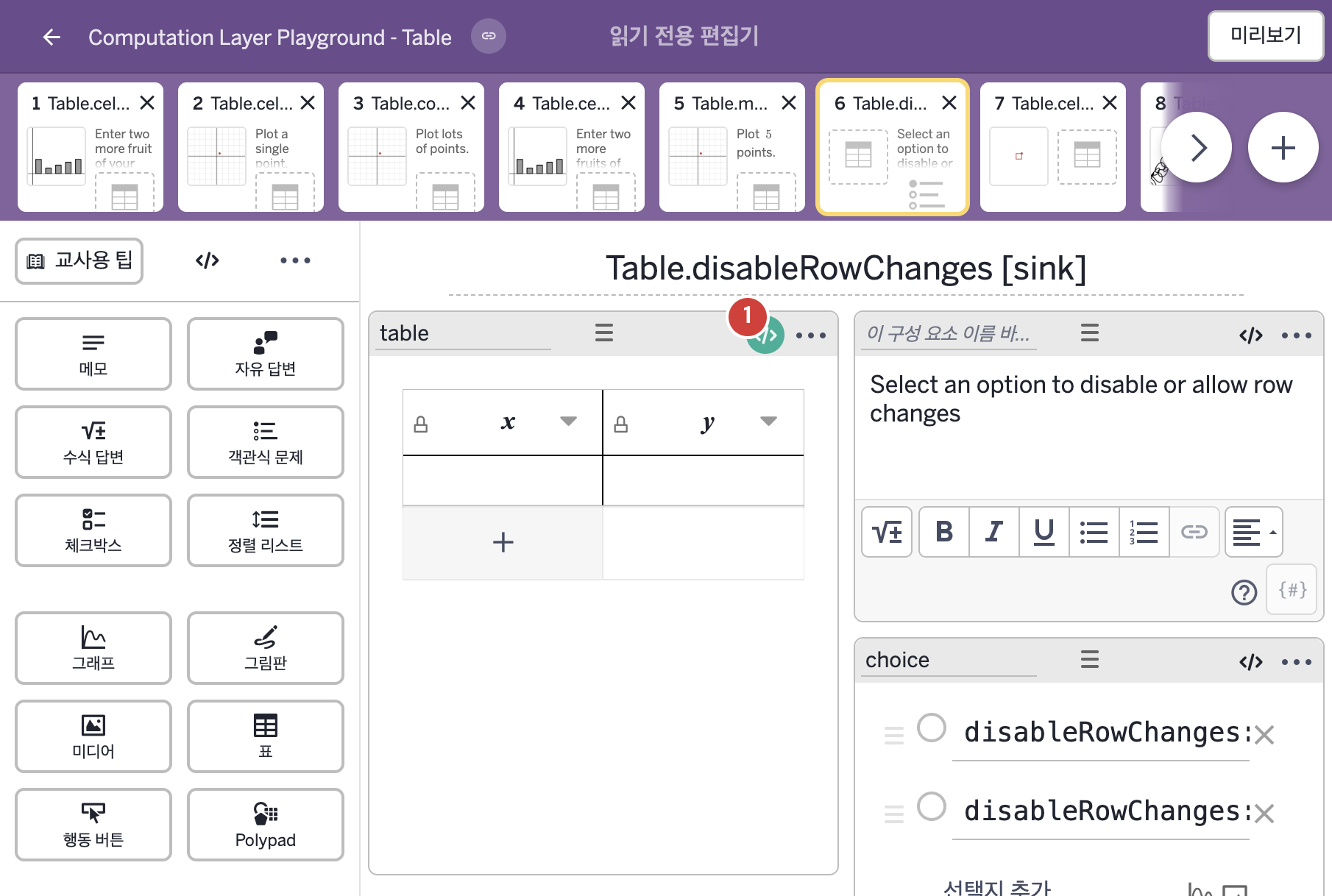
화면에 적힌 영어 문구(원문):
- x
y
- Select an option to disable or allow row changes
- disableRowChanges: true
disableRowChanges: false
2. CL이 입력된 곳
코드 안의 회색 줄은 원문 영어 주석이고, 파란 줄은 그 영어 주석의 번역이며, 연분홍 줄은 코드가 하는 일의 설명이다.
| 번호 | 이름 | 종류 | CL 코드 원문, 번역, 설명 |
|---|
| 1 | table | 표 | # The ability to add rows will be disabled when
# the first multiple choice option is selected.
▷ 첫 번째 객관식 보기를 고르면 행을 추가하는 기능이 꺼진다.
disableRowChanges: choice.isSelected(1)
▶ 표의 행 변경 금지 여부(disableRowChanges)는 객관식 구성요소 choice의 1번 보기가 선택되었는지 여부(choice.isSelected(1))로 한다.
disableRowChanges는 학생이 행을 더하거나 뺄 수 있는지를 참/거짓으로 정하며, 참이면 학생이 행을 더하거나 뺄 수 없다. 빈칸 채우기 방식과 비슷하지만 이미 있는 셀은 편집할 수 있으며, 셀별 함수(cellContent, cellNumericValue 등)와 함께 쓰기를 권한다. isSelected(번호)는 객관식 구성요소에서 그 번호의 보기가 선택되었는지를 알려 준다.
|