← 수업 제작 도구
홈 › Components › Sketch (그림판) › 화면 3

화면 3. Sketch.bounds [source]

원본: Computation Layer 문서(Sketch (그림판)) · Try It (원본 화면)

화면 번호3 / 34
문서 항목 설명 (원문)bounds Gets the bounds of a sketch component.

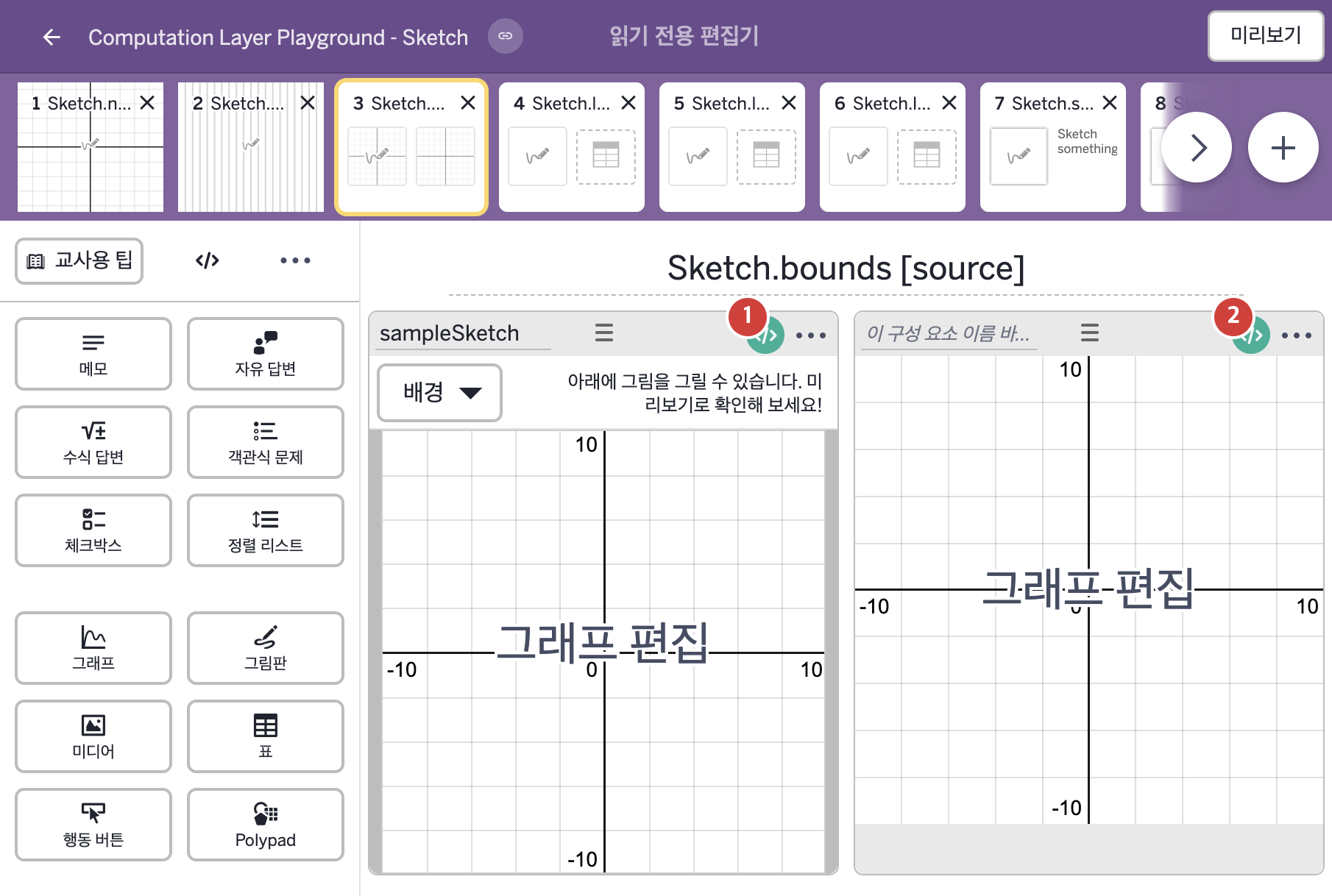
1. 화면 캡처 (빨간 번호 = 아래 표의 번호)

화면 3 캡처

2. CL이 입력된 곳

코드 안의 회색 줄은 원문 영어 주석이고, 파란 줄은 그 영어 주석의 번역이며, 연분홍 줄은 코드가 하는 일의 설명이다.

번호이름종류CL 코드 원문, 번역, 설명
1sampleSketch그림판
# Create a variable that takes the number of strokes in 
# the sketch and adds one.
▷ 스케치의 획 수에 1을 더한 값을 가지는 변수를 만든다.
count = numericValue("${this.sketch.strokeCount}+1")
▶ 변수 count는 "${this.sketch.strokeCount}+1"을 numericValue로 계산한 값, 즉 현재 획 수에 1을 더한 값으로 한다.
numericValue(…)는 latex 글자를 숫자로 계산하는 함수이고, strokeCount는 스케치를 받아 획의 수를 숫자로 돌려준다. ${ }는 글자 안에 변수의 값을 끼워 넣는 표기이다.
# Use the stroke count to set the bounds of the sketch # component using a bounds sink. ▷ 획 수를 이용해 bounds sink로 그림판 구성요소의 경계를 정한다. bounds: makeBounds(numericValue("-${count}"),count,numericValue("-${count}"),count) ▶ 그림판의 경계(bounds)는 makeBounds(numericValue("-${count}"),count,numericValue("-${count}"),count), 즉 왼쪽 -count, 오른쪽 count, 아래 -count, 위 count로 한다.
bounds는 이 그림판의 경계를 정하고, 그래프 배경이 있으면 그 경계도 같게 바뀐다. makeBounds(left, right, bottom, top)은 왼쪽, 오른쪽, 아래, 위 값으로 경계 객체를 만든다. count가 획 수에 따라 커지므로 획이 늘어날수록 경계가 넓어진다.
2레이블 없는 그래프그래프
# Define the bounds of this graph component
# to match the bounds of the sketch background.
▷ 이 그래프 구성요소의 경계를 그림판 배경의 경계와 같게 정한다.

bounds: sampleSketch.bounds
▶ 그래프의 경계(bounds)는 그림판 sampleSketch의 경계(sampleSketch.bounds)로 한다.
bounds는 그래프의 경계를 정하고, sampleSketch.bounds는 그림판 sampleSketch의 경계를 가져온다.