화면 9. Polypad.readOnly [sink]
원본: Computation Layer 문서(Polypad) · Try It (원본 화면)
| 화면 번호 | 9 / 9 |
|---|
| 문서 항목 설명 (원문) | readOnly Sets a Boolean value that determines whether or not a component will be ignored when determining a screen's correctness. If all components have a readOnly value of "true," we display a dash for the student's screen in the dashboard's summary view, indicating teachers can focus their efforts elsewhere. |
|---|
1. 화면 캡처 (빨간 번호 = 아래 표의 번호)
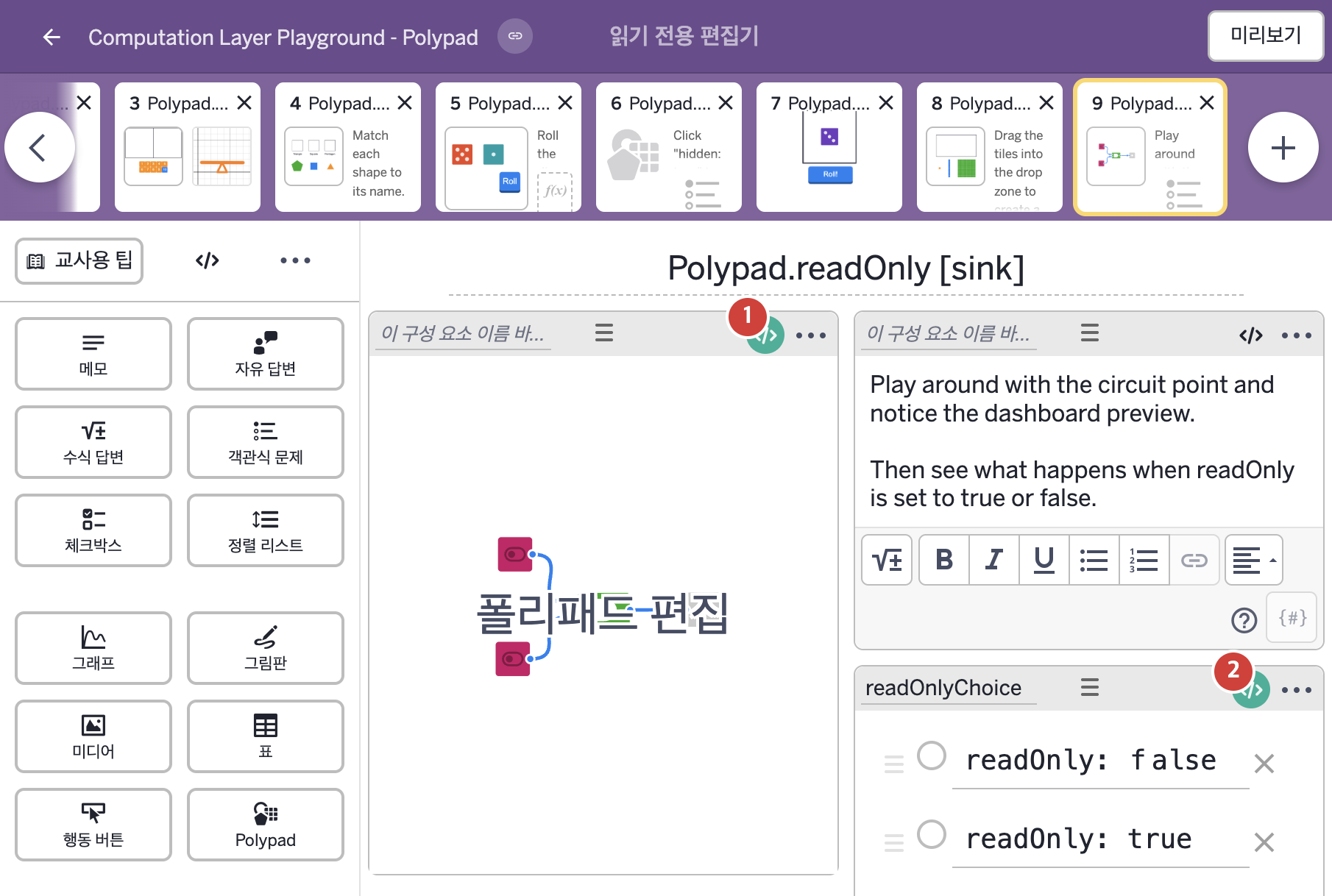
화면에 적힌 영어 문구(원문):
- Play around with the circuit point and notice the dashboard preview.
Then see what happens when readOnly is set to true or false.
- readOnly: false
readOnly: true
2. CL이 입력된 곳
코드 안의 회색 줄은 원문 영어 주석이고, 파란 줄은 그 영어 주석의 번역이며, 연분홍 줄은 코드가 하는 일의 설명이다.
| 번호 | 이름 | 종류 | CL 코드 원문, 번역, 설명 |
|---|
| 1 | 레이블 없는 Polypad | 일부화면 POLYPAD | # readOnly determines whether the dashboard should be
# showing any form of correctness. Here, we have set
# "readOnly" as an example. Simply type
# "readOnly: true" if you do not want any information
# from the component to show in the dashboard.
▷ readOnly는 대시보드에 어떤 형태의 정답 표시든 보여 줄지를 정한다. 여기서는 예시로 "readOnly"를 정했다. 구성요소의 어떤 정보도 대시보드에 표시하고 싶지 않으면 그냥 "readOnly: true"라고 적는다.
readOnly: readOnlyChoice.isSelected(2)
▶ Polypad의 읽기 전용 여부(readOnly)는 객관식 구성요소 readOnlyChoice의 2번 보기가 선택되었을 때(readOnlyChoice.isSelected(2)) 참으로 한다.
readOnly가 참이면 화면의 정답 판정에서 이 구성요소를 무시하고, 모든 구성요소의 readOnly가 참이면 대시보드 요약에 대시(-)를 표시한다. isSelected(번호)는 객관식 구성요소에서 그 번호의 보기가 선택되었는지를 참 또는 거짓으로 알려 준다.
|
| 2 | readOnlyChoice | 객관식 문제 | readOnly: true
▶ 객관식의 읽기 전용 여부(readOnly)는 true로 한다.
readOnly가 참이면 화면의 정답 판정에서 이 구성요소를 무시하고, 모든 구성요소의 readOnly가 참이면 대시보드 요약에 대시(-)를 표시한다.
|