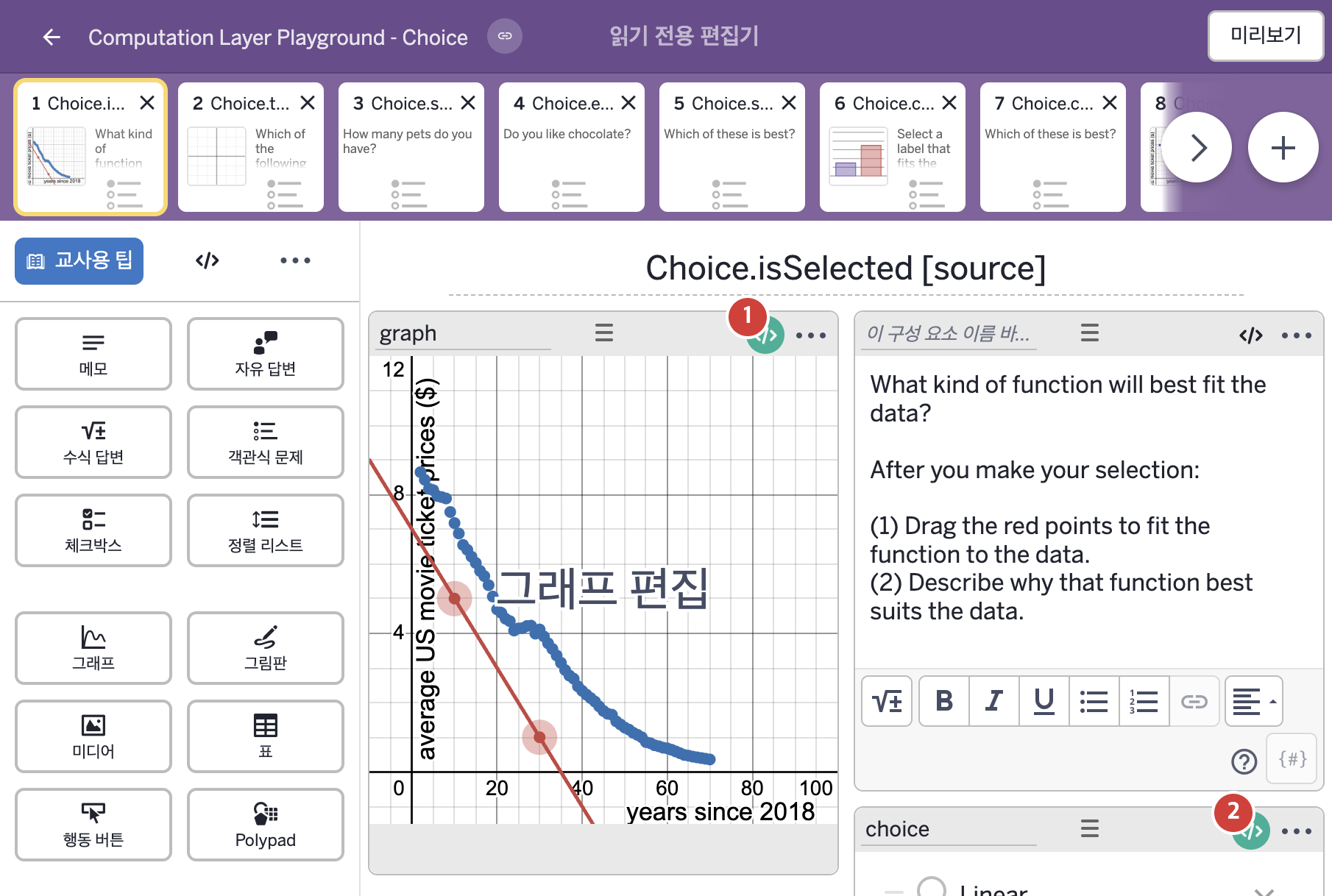
코드 안의 회색 줄은 원문 영어 주석이고, 파란 줄은 그 영어 주석의 번역이며, 연분홍 줄은 코드가 하는 일의 설명이다.
| 번호 | 이름 | 종류 | CL 코드 원문, 번역, 설명 |
|---|
| 1 | graph | 그래프 | # We use isSelected here to tell us which model has been selected.
# 1: linear. 2: quadratic. 3: exponential.
▷ isSelected를 여기에서 사용해 어느 모델이 선택되었는지 알아낸다.
1: 일차 함수. 2: 이차 함수. 3: 지수 함수.
number("M"):
when choice.isSelected(1) 1
when choice.isSelected(2) 2
when choice.isSelected(3) 3
otherwise 0
▶ 그래프의 변수 "M"은 choice의 1번 보기가 선택되었다면(choice.isSelected(1)) 1, 2번 보기가 선택되었다면 2, 3번 보기가 선택되었다면 3, 어느 것도 선택되지 않았다면 0으로 한다.
number("M")은 이 그래프 안의 변수 "M"의 값을 정하고, isSelected(번호)는 객관식 구성요소에서 그 번호의 보기가 선택되었는지를 참 또는 거짓으로 알려 준다. when은 조건을 차례로 확인해 처음 맞는 값을 쓴다.
|
| 2 | choice | 체크박스 | # Uses explainPrompt sink to dynamically change the request
# for more explanation on an explain multiple choice component.
▷ explainPrompt sink를 사용해, 설명(explain)이 있는 객관식 구성요소에서 더 설명해 달라고 요청하는 문구를 상황에 따라 바꾼다.
explainPrompt:
when this.isSelected(1) "Why is linear the best model?"
when this.isSelected(2) "Why is quadratic the best model?"
when this.isSelected(3) "Why is exponential the best model?"
otherwise ""
▶ 설명 안내 문구(explainPrompt)는 이 구성요소의 1번 보기가 선택되었다면(this.isSelected(1)) "Why is linear the best model?"(일차 함수가 가장 좋은 모델인 이유는 무엇인가?), 2번이면 "Why is quadratic the best model?"(이차 함수가 가장 좋은 모델인 이유는 무엇인가?), 3번이면 "Why is exponential the best model?"(지수 함수가 가장 좋은 모델인 이유는 무엇인가?), 어느 것도 선택되지 않았다면 빈 글자로 한다.
explainPrompt는 설명(explain)이 있는 객관식 구성요소에서 일반 문구 "Explain your thinking" 자리에 쓸 글자를 정한다. this는 이 구성요소 자신이며, 자신의 값을 가져올 때는 구성요소 이름을 쓰지 않아도 된다. isSelected(번호)는 객관식 구성요소에서 그 번호의 보기가 선택되었는지를 참 또는 거짓으로 알려 주고, when은 조건을 차례로 확인해 처음 맞는 값을 쓴다.
# Uses initialText to dynamically change the content of the
# explain input depending on student choice.
▷ initialText를 사용해, 학생이 고른 보기에 따라 설명 입력칸의 내용을 바꾼다.
initialText:
when this.isSelected(1) "I think linear is best because ..."
when this.isSelected(2) "I think quadratic is best because ..."
when this.isSelected(3) "I think exponential is best because ..."
otherwise ""
▶ 초기에 입력된 내용(initialText)은 이 구성요소의 1번 보기가 선택되었다면(this.isSelected(1)) "I think linear is best because ..."(나는 일차 함수가 가장 좋다고 생각한다. 왜냐하면 ...), 2번이면 "I think quadratic is best because ..."(나는 이차 함수가 가장 좋다고 생각한다. 왜냐하면 ...), 3번이면 "I think exponential is best because ..."(나는 지수 함수가 가장 좋다고 생각한다. 왜냐하면 ...), 어느 것도 선택되지 않았다면 빈 글자로 한다.
initialText는 설명(explain) 입력칸에 처음 들어 있는 글자를 정하고, when은 조건을 차례로 확인해 처음 맞는 값을 쓴다.
# Marks the screen correct if the student chose the third option
# in the multiple choice component.
▷ 학생이 객관식 구성요소에서 세 번째 보기를 골랐다면 화면을 정답으로 표시한다.
correct: this.isSelected(3)
▶ 정답 조건(correct)은 이 구성요소의 3번 보기가 선택되었다면 참, 아니면 거짓(this.isSelected(3))으로 한다.
correct는 참이면 교사 대시보드 요약에 회색 체크를 표시한다.
# Marks the screen with a warning and a tooltip if the student
# didn't choose any of the three multiple choice options.
▷ 학생이 객관식 보기 세 개 중 아무것도 고르지 않았다면 화면에 경고와 말풍선(툴팁)을 표시한다.
warning:
when not(this.isSelected(1) or this.isSelected(2) or this.isSelected(3)) "No option selected!"
otherwise ""
▶ 교사 대시보드의 경고(warning)는 1번, 2번, 3번 보기 중 어느 것도 선택되지 않았다면(not(this.isSelected(1) or this.isSelected(2) or this.isSelected(3))) "No option selected!"(선택한 보기가 없다!), 그렇지 않으면 빈 글자(경고 없음)로 한다.
or는 둘 중 하나라도 참이면 참이고, not(…)은 참/거짓을 뒤집는다. warning은 교사 대시보드의 경고 아이콘에 말풍선으로 글자를 표시하고, when은 조건을 차례로 확인해 처음 맞는 값을 쓴다.
|